Friday, September 18, 2015

Razor helper functions for enabling XPM in 2013 SP1 Tridion

Introduction


By default Tridion installation will let you enabling inline edit of component and pages. And there is documentation on how to output syntax in dreamweaver. Detail documentation on the same can be found at https://docs.sdl.com/LiveContent/web/pub.xql?action=home&pub=SDL%20Tridion%20full%20documentation-v1&lang=en-US#docid=GUID-E7D54121-70A2-4FA6-A516-8ADB8E45AC13&addHistory=true&query=&scope=&tid=&filename=GUID-E7D54121-70A2-4FA6-A516-8ADB8E45AC13.xml&resource=&inner_id=&toc=false&eventType=lcContent.loadDocGUID-E7D54121-70A2-4FA6-A516-8ADB8E45AC13
However, in case of razor templating we do not have straight forward functions.  Hence this article. Here you will find syntax for razor templating functions to enable inline editing of different fields

Details

The Tridion.ContentManager.config file, after Razor mendiator installation from https://code.google.com/p/razor-mediator-4-tridion/, will contain a configurable section for the Razor Mediator for further customization of your templates, such as adding references to other libraries to your templates, and including namespace imports globally to all of your templates.

Below is a sample of what this section can look like. The code that implements the helper functions for XPM is implemented in razor-helpers.txt.

<razor.mediator cacheTime="600" extractBinaries="true" adminUser="DOMAIN\Username">
    <namespaces>
        <add namespace="System.Linq" />
        <add namespace="Tridion.ContentManagement" />
    </namespaces>
    <assemblies>
        <add assembly="RazorSample.Test, Version=1.0.0.0, Culture=neutral, PublicKeyToken=60ad7434f03dfcdc" />
        <add assembly="C:\Program Files\Razor\Tests\Test.Sample.dll" />
    </assemblies>
    <imports>
        <add import=\"tcm:120-2233-2048\" />
        <add import=\"/wevdav/020 Design/Building Blocks/System/TBBs/Helpers/razor-helpers.cshtml\" />
        <add import=\"C:\\Program Files\\Razor Mediator\\razor-helpers.txt\" />
        <add import=\"tcm:120-2200-2048\" publications=\"020 Design Master,030 Another Web Design\" />
    </imports>
    <importSettings includeConfigWhereUsed="true" includeImportWhereUsed="true" replaceRelativePaths="false" />
</razor.mediator>

Code

Below is the code(razor-helpers.txt) which has functions to use in your razor template building blocks
@using System.Collections.Generic
@using System.Linq
@using System.Linq.Expressions
@using System.Web
@using Tridion.ContentManager
@using Tridion.Extensions.Mediators.Razor.Models
@using Tridion.ContentManager.Templating.Expression
@using Tridion.ContentManager.ContentManagement

@helper GetFieldValue(string fieldExpression = null, int index = 0)
{
    var fn = new BuiltInFunctions(TridionHelper.Engine, TridionHelper.Package);
    try {
        @fn.GetFieldValue(fieldExpression, index)
    } catch {
        Log.Debug("Unable to resolve: " + fieldExpression + " with index: " + index);
    }
}

@helper FieldStartMarker(string fieldExpression)
{
    var fn = new BuiltInFunctions(TridionHelper.Engine, TridionHelper.Package);
    @fn.FieldStartMarker(fieldExpression)
}

@helper FieldEndMarker()
{
    @:</tcdl:Field>
}

@helper FieldValueStartMarker(int index = 0)
{
    @:<tcdl:FieldValue index="@index">
}

@helper FieldValueEndMarker()
{
    @:</tcdl:FieldValue>
}

@helper StartField(string fieldExpression = null, int index = 0, bool singleValue = true, bool useTcdl = false)
{
    if (fieldExpression != null && singleValue)
    {
        @FieldStartMarker(fieldExpression)
    }
    if (fieldExpression != null || useTcdl)
    {
        @FieldValueStartMarker(index)
    }
}

@helper EndField(bool useTcdl = false, bool singleValue = true)
{
    if (useTcdl)
    {
        @FieldValueEndMarker()
    }
    if (useTcdl && singleValue)
    {
        @FieldEndMarker()
    }
}

@helper StartSingleTcdlField(string fieldExpression)
{
    @StartField(fieldExpression, 0, true, true)
}

@helper EndSingleTcdlField()
{
    @EndField(true, true)
}

@helper RenderSingleTcdlField(string fieldExpression)
{
    @StartField(fieldExpression, 0, true, true)
    @GetFieldValue(fieldExpression, 0)
    @EndField(true, true)
}

@helper RenderMultipleTcdlField(string fieldExpression, int index)
{
    @StartField(fieldExpression, index, true, true)
    @GetFieldValue(fieldExpression, index)
    @EndField(true, true)
}

@helper GetHrefOrTridionHref(dynamic linkComp)
{
Component comp= TridionHelper.Engine.GetObject(linkComp.ID) as Component;
if (linkComp != null && comp.ComponentType == ComponentType.Multimedia)
{
@: href="@linkComp.ID" 
}
else if (linkComp != null)
{
@: tridion:href="@linkComp.ID" 
}
}

@* --------------- COMMON FIELD TYPES ---------------------- *@
 
@helper Text(string text, int index, bool useTcdl = true)
{
    @Text(text, null, index, false, useTcdl)
}
 
@helper Text(string text, string fieldExpression = null, int index = 0, bool singleValue = true, bool useTcdl = false)
{
    @StartField(fieldExpression, index, singleValue, Equals(useTcdl))
    @HtmlEncode(text)
    @EndField(fieldExpression != null || useTcdl, singleValue)
}
 
@helper RichText(string text, int index, bool addParagraph = true, bool useTcdl=true)
{
    @RichText(text, null, addParagraph, index, false, useTcdl)
}
 
@helper RichText(string text, string fieldExpression = null, bool addParagraph = true, int index = 0, bool singleValue = true, bool useTcdl = false)
{
    @StartField(fieldExpression, index, singleValue, useTcdl)
    @((!addParagraph || text == null || text.Contains("</p>")) ? text : "<p>" + text + "</p>")
    @EndField(fieldExpression != null || useTcdl, singleValue)
}
 
@helper Img(ComponentModel imgComp, int index, string attributes="", bool useTcdl=true)
{
    @Img(imgComp, null, attributes, index, false, useTcdl)
}
 
@helper Img(ComponentModel imgComp, string fieldExpression = null, string attributes = "", int index = 0, bool singleValue = true, bool useTcdl = false)
{
    @StartField(fieldExpression, index, singleValue, useTcdl)
    
    if (imgComp != null)
    {
        var alt = imgComp.Title;
        if(imgComp.MetaData != null && imgComp.MetaData.HasValue("AltText"))
        {
            alt = imgComp.MetaData.AltText;
        }
        @:<img src="@imgComp.ID" alt="@alt" @attributes />
    }
    
    @EndField(fieldExpression!=null||useTcdl,singleValue)
}
 
@helper Date(DateTime date, int index, string attributes="", string format = null, bool useTcdl = true)
{
    @Date(date, null, attributes, format, index, false, useTcdl)
}
 
@helper Date(DateTime date, string fieldExpression = null, string attributes = "", string format = "dd MMM yyyy", int index = 0, bool singleValue = true, bool useTcdl = false)
{
    @StartField(fieldExpression, index, singleValue, useTcdl)
    
    if (date > DateTime.MinValue)
    {
        @:<time datetime="@date.ToString("s")" @attributes>@date.ToString(format)</time>
    }    
    
    @EndField(fieldExpression != null || useTcdl, singleValue)
}
 
@helper Link(dynamic linkComp, string linkText, int index, string attributes = "", bool useTcdl = true)
{
    @Link(linkComp, linkText, null, attributes, index, false, useTcdl)
}
 
@helper Link(dynamic linkComp, string linkText = "", string fieldExpression = null, string attributes = "", int index = 0, bool singleValue = true, bool useTcdl = false)
{
    @StartLink(linkComp, fieldExpression, attributes, index, singleValue, useTcdl)
    @linkText
    @EndLink(fieldExpression != null || useTcdl, singleValue)
}
 
@helper ExternalLink(string href, string linkText, int index, string attributes="", bool useTcdl = true)
{
    @ExternalLink(href, linkText, null, attributes, index, false, useTcdl)
}
 
@helper ExternalLink(string href, string linkText, string fieldExpression = null, string attributes = "", int index = 0, bool singleValue = true, bool useTcdl = false)
{
    @StartExternalLink(href, fieldExpression, attributes, index, singleValue, useTcdl)
    @linkText
    @EndLink(fieldExpression != null || useTcdl, singleValue)
}
 
@helper StartLink(dynamic linkComp, string fieldExpression = null, string attributes = "", int index = 0, bool singleValue = true, bool useTcdl = false)
{
    @StartField(fieldExpression, index, singleValue, useTcdl)
    Component comp= TridionHelper.Engine.GetObject(linkComp.ID) as Component;
    if (linkComp != null && comp.ComponentType == ComponentType.Multimedia)
    {
        @:<a href="@linkComp.ID" @attributes>
    }
    else if (linkComp != null)
    {
        @:<a tridion:href="@linkComp.ID" @attributes>
    }

}
 
@helper StartExternalLink(string href, string fieldExpression = null, string attributes = "", int index = 0, bool singleValue = true, bool useTcdl = false)
{
    @StartField(fieldExpression, index, singleValue, useTcdl)
    
    if (!String.IsNullOrEmpty(href))
    {
        @:<a href="@href" @attributes>
    }
}
 
@helper EndLink(dynamic value = null, bool useTcdl = false, bool singleValue = true)
{
    if (value!=null)
    {
        @:</a>
    }
    @EndField(useTcdl, singleValue)
}

Examples for Razor Template Building Blocks

The list of examples shows how to use the helper functions from above section for different types of tridion fields in your Razor template building block

Simple Text Field

@RenderSingleTcdlField("Component.Fields.Title")

Multivalue Text Field

//get the index of the field and pass on the function
@RenderMultipleTcdlField("Component.Fields.Title",index)

Multimedia Field

@Img(Component.Fields.Image, "Component.Fields.Image")

Component Link Field

@{
     var linkAttr = "";
     linkAttr = " target=\"_blank\"";
    }
}
@StartLink(Component.Fields.EmbeddLinkField.LinkInternal, "Component.Fields.EmbeddLinkField.LinkInternal", linkAttr)
 //SOME TEXT OR IMAGE IF NEED TO BE CLICKED TO THE INTERNAL LINK
@EndLink(Component.Fields.EmbeddLinkField.LinkInternal, true, true)

External Link Field

Eg1: If you need your link to be wrapped around some content <a href="google.com"> some other related content may have images/paragraphs etc </a>

@{
     var linkAttr = "";
     linkAttr = " target=\"_blank\"";
    }
}
   @StartExternalLink(Component.Fields.EmbeddLinkField.LinkExternal, "Component.Fields.EmbeddLinkField.LinkExternal", linkAttr)
 //SOME TEXT OR IMAGE 
  @EndLink(Component.Fields.EmbeddLinkField.LinkExternal, true, true)

Eg 2: If you need your link to be wrapped around LinkTitle/Any other single field
@ExternalLink(Component.Fields.EmbeddLinkField.LinkExternal, Component.Fields.LinkTitle, "Component.Fields.EmbeddLinkField.LinkExternal", linkAttr)

There are other helper functions for RichText/Date which can be used if needed. Else you can use 
RenderSingleTcdlField function for same as well.

Happy coding.

Monday, April 15, 2013

Tridion Odata retrieves 25 results by default (this setting can be overridden)


If I send a query to the OData service it is restricting a number of results to 25. 

Eg:
The following filter is having more than 25 results actually but the Odata is returning the first 25 results alone. The same behaviour is showing for Components, ComponentPresentations.
List<OEntity> customMetasSg1 = new ArrayList<OEntity>(100);
customMetasSg1 = consumer.getEntities("CustomMetas")
.filter(
"KeyName eq 'StructureGroupID'"
)
.execute().toList();
Output : customMetasSg1.size()25


Is there a way this setting can be overridden to get all the results based on query criteria?

Yes
Option 1: setting &top=XX
Option 2: setting DefaultTop in cd_webservice_conf.xml as described http://sdllivecontent.sdl.com/LiveContent/content/en-US/SDL_Tridion_2011_SPONE/cd_webservice_confN1001C#addHistory=true&filename=cd_webservice_confReference.ConfigNodeN1000D.xml&docid=cd_webservice_confN1000D&inner_id=&tid=&query=&scope=&resource=&eventType=lcContent.loadDoccd_webservice_confN1000D

Tridion Deployer Extensions - Insert DCPs in custom Database - Custom Module

For getting started with tridion deployer extensions please refer
https://sdltridionworld.com/articles/sdltridion2011/tutorials/Deployer_Extensions_With_Eclipse_1.aspx
Below is just sample requirement and sample code of deployer extension.

Requirement

After Successful Publish , Some of  DCP's (Dynamic Component Presentations) should be saved in Custom DB along with Broker DB.
Below Solution gives you example of:

  • How to read tridion dynamic component presentations from transcation ZIP file
  • How to read config values form cd_deployer_conf.xml  in your Java program config.getParameterValue
  • How to read Metadata of Component using data.getMetaData Tridion API
  • How to talk to JDBC and insert content 
  • How to extend Module 
  • How to write Custom Module

Solution

I have certain templates whose DCPs need to be saved in DV

  1. Publish XML
  2. GSA Content XML
  3. GSA Asset XML


All CONTENT(NOT Binary) published with above Component Templates should be saved in custom DB
All BINARY Content published with GSA Asset XML DCP should be saved in custom DB


Sample cd_deployer_conf.xml entry


In your Java Project refer following libraries

Sample Java Code (Deployer Extensions):
package com.tridion.abc.extensions;
import java.io.File;
import java.io.FileInputStream;
import java.io.FileNotFoundException;
import java.io.FileReader;
import java.io.IOException;
import java.io.InputStream;
import java.sql.Connection;
import java.sql.PreparedStatement;
import java.sql.ResultSet;
import java.util.Calendar;
import java.util.Iterator;

import javax.naming.Context;
import javax.naming.NamingException;
import javax.sql.DataSource;

import org.apache.commons.io.IOUtils;
import org.slf4j.Logger;
import org.slf4j.LoggerFactory;

import com.tridion.configuration.Configuration;
import com.tridion.configuration.ConfigurationException;
import com.tridion.deployer.Module;
import com.tridion.deployer.ProcessingException;
import com.tridion.deployer.Processor;
import com.tridion.transport.transportpackage.Component;
import com.tridion.transport.transportpackage.ComponentPresentation;
import com.tridion.transport.transportpackage.ComponentPresentationKey;
import com.tridion.transport.transportpackage.MetaData;
import com.tridion.transport.transportpackage.MetaDataFile;
import com.tridion.transport.transportpackage.ProcessorInstructions;
import com.tridion.transport.transportpackage.Section;
import com.tridion.transport.transportpackage.TransportPackage;
import com.tridion.util.TCMURI;

public class InsertFeedintoDB extends Module {
private static Logger log = LoggerFactory
.getLogger(InsertFeedintoDB.class);
String action = null;
String contentXML = null;
String _GSAContentXML = null;
String _GSAAssetXML = null;
static String _DBSourceURL = null;
private static final String SQL_SELECTBY_CONTENTID = "SELECT CNTN_ID FROM C0064DBA.TIBPUB_EVNT WHERE CNTN_ID=?";
private static final String SQL_INSERT_COMPONENT = "INSERT INTO C0064DBA.TIBPUB_EVNT (PUB_EVNT_ID,CNTN_ID,EVNT_TS, CNTN_XML,EVNT_TYP,SCHM_NM ,GSA_CNT_XML , GSA_AST_XML) VALUES (C0064DBA.PUB_EVNT_SEQ.NEXTVAL,?,?,?,?,?,?,?)";
private static final String SQL_UPDATE_PUBLISHXML = "UPDATE C0064DBA.TIBPUB_EVNT SET CNTN_XML=?, EVNT_TS=?,EVNT_TYP=? WHERE CNTN_ID=?";
private static final String SQL_UPDATE_GSAASSETXML = "UPDATE C0064DBA.TIBPUB_EVNT SET GSA_AST_XML=?, EVNT_TS=?,EVNT_TYP=?  WHERE CNTN_ID=?";
private static final String SQL_UPDATE_GSACONTENTXML = "UPDATE C0064DBA.TIBPUB_EVNT SET GSA_CNT_XML=?, EVNT_TS=?,EVNT_TYP=?  WHERE CNTN_ID=?";

static DataSource _datasource = null;
//String itemXMLCLOB = null;
InputStream itemXMLCLOB;
int fileLength=0;
MetaDataFile compPresMetadata = null;
Connection conn = null;
MetaDataFile componentMeta = null;
String _RppAssetSchemaName = null;
String _RppAssetSchemaNameSpace = null;

public InsertFeedintoDB(Configuration config, Processor processor)
throws ConfigurationException {
super(config, processor);
log.info("InsertRPPFeedintoDB invoked");
}

// This method is called once for each TransportPackage that is
// deployed.
public void process(TransportPackage data) throws ProcessingException {
try {
contentXML = config.getParameterValue("PublishXMLTemplateName");
_GSAContentXML = config
.getParameterValue("GSAContentXMLTemplateName");
_GSAAssetXML = config.getParameterValue("GSAAssetTemplateName");
_DBSourceURL = config.getParameterValue("DBSourceURL");
_RppAssetSchemaName = config.getParameterValue("RppAssetSchemaName");
_RppAssetSchemaNameSpace = config.getParameterValue("RppAssetSchemaNameSpace");
log.debug("XML template value from config :" + "CONTENT XML:"
+ contentXML + "GSA CONTENT XML:" + _GSAContentXML
+ "GSA ASSET XML:" + _GSAAssetXML + "DB Url:"
+ _DBSourceURL);
getDataSource();
conn = getConnectionFromDataSource(_datasource);
ProcessorInstructions instructions = data
.getProcessorInstructions();
action = instructions.getAction();
MetaData compPresMetadataInfo = instructions
.getMetaData("ComponentPresentations");
MetaData compMetadataInfo = instructions.getMetaData("Components");
componentMeta = data.getMetaData("Components",
compMetadataInfo.getName());
compPresMetadata = data.getMetaData("ComponentPresentations",
compPresMetadataInfo.getName());
log.debug("Action " + action + " started for publication "
+ instructions.getPublicationId());

Section section = null;
Iterator<Section> Sections = instructions.getSections();
for (; Sections.hasNext(); processSection(section, data)) {
section = Sections.next();
}
// TODO: Insert into RPP DB
log.info("process started for inserting items into RPP Database");
} catch (ConfigurationException ex) {
log.error("Could not get custom configuration", ex.getMessage());
}
catch (Exception ex) {
log.error("Exception Occured", ex.getMessage());
}
finally {
try {
if (conn!=null)
conn.close();
} catch (Exception ex) {
log.error("InsertRPP DB Exception closing connection"
+ ex.getMessage());
}
}

}

protected void processSection(Section section, TransportPackage data) {
log.debug("RPP Processing Section " + section.getName());
Iterator iterator = section.getFileItems();
Object item;
for (; iterator.hasNext(); processItem(item, section, data)) {
item = iterator.next();
}
Section subSection;
for (Iterator i$ = section.getSubSections().iterator(); i$.hasNext(); processSection(
subSection, data))
subSection = (Section) i$.next();
}

protected void processItem(Object obj, Section section,
TransportPackage data) {
if (obj instanceof ComponentPresentationKey) {
log.debug("Entered ComponentPresentation");
ComponentPresentationKey cpKey = (ComponentPresentationKey) obj;
ComponentPresentation componentPresentation = (ComponentPresentation) compPresMetadata
.getMetaData(cpKey);
log.debug("componentPresentation " + componentPresentation);
log.debug("componentPresentationgetTemplateKey getTitle()"
+ componentPresentation.getTemplateKey().getTitle());
try {
File cpFile = new File((new StringBuilder())
.append(data.getLocationPath())
.append(section.getRelativePath())
.append(cpKey.getName()).toString());
fileLength = (int) cpFile.length();
itemXMLCLOB=(InputStream) new FileInputStream(cpFile); // Added to get input stream from file
//itemXMLCLOB = IOUtils.toString(new FileReader(cpFile));
/**log.debug("itemXMLCLOB"
+ itemXMLCLOB);**/
TCMURI compTCMID = componentPresentation.getComponentKey()
.getId();
Component component = (Component)componentMeta.getMetaData(componentPresentation.getComponentKey());
log.debug("component"
+ component);
log.debug("compTCMID"
+ compTCMID);
log.debug("component.getSchemaNamespace()"
+ component.getSchemaNamespace());

String compID = compTCMID.toString();
String schemaName = null;

String SGID = null;
if(component.getSchemaNamespace().equalsIgnoreCase(_RppAssetSchemaNameSpace))
{
schemaName = _RppAssetSchemaName;
if(component.getCustomMeta().getElementsByTagName("StructureGroupID").item(0)!=null)
SGID = component.getCustomMeta().getElementsByTagName("StructureGroupID").item(0).getChildNodes().item(0).getNodeValue();
log.debug("SGID " + SGID);
}
else if(component.getCustomMeta().getElementsByTagName("BasedOnSchema").getLength() > 0)
schemaName = component.getCustomMeta().getElementsByTagName("BasedOnSchema").item(0).getChildNodes().item(0).getNodeValue();


log.debug("schemaName " + schemaName);
if (componentPresentation.getTemplateKey().getTitle()
.equalsIgnoreCase(contentXML)) {

if (!checkIfRecordExists(compID)) {
log.debug("No record exists fo Id therfore inserting"
+ compID);
// insert row into table Publish itemXMLCLOB

insertComponent(compID, schemaName, contentXML);
} else {
updateComponent(compID, contentXML);
// update table into table Publish itemXMLCLOB
}

}
if (componentPresentation.getTemplateKey().getTitle()
.equalsIgnoreCase(_GSAContentXML)) {
if (!checkIfRecordExists(compID)) {
log.debug("No record exists fo Id therfore inserting"
+ compID);
// insert row into table Publish itemXMLCLOB
insertComponent(compID, schemaName, _GSAContentXML);
} else {
updateComponent(compID, _GSAContentXML);
// update table into table Publish itemXMLCLOB
}
}
if (componentPresentation.getTemplateKey().getTitle()
.equalsIgnoreCase(_GSAAssetXML)) {

if(!schemaName.equalsIgnoreCase(_RppAssetSchemaName) || (schemaName.equalsIgnoreCase(_RppAssetSchemaName) && !SGID.isEmpty()))
{
if (!checkIfRecordExists(compID)) {
log.debug("No record exists fo Id therfore inserting"
+ compID);
insertComponent(compID, schemaName, _GSAAssetXML);

} else {
log.debug("Record exists fo Id therfore updating"
+ compID);
updateComponent(compID, _GSAAssetXML);
}
}

}

} catch (FileNotFoundException e) {
// TODO Auto-generated catch block
log.error("File NOT FOUND" + e.getMessage());

} catch (IOException e) {
// TODO Auto-generated catch block
log.error("IOException" + e.getMessage());
}
}
}

void insertComponent(String compID, String schemaName, String templateName) {
try {
log.debug("Insert started for Id" + compID);
PreparedStatement pstmt = null;
try {
Calendar calendar = Calendar.getInstance();
java.sql.Timestamp ourJavaTimestampObject = new java.sql.Timestamp(
calendar.getTime().getTime());
pstmt = conn.prepareStatement(SQL_INSERT_COMPONENT);
pstmt.setString(1, compID);
pstmt.setTimestamp(2, ourJavaTimestampObject);
if (templateName.equalsIgnoreCase(contentXML))
//pstmt.setString(3, itemXMLCLOB);
pstmt.setAsciiStream(3, itemXMLCLOB,fileLength);
else
pstmt.setString(3, null);
pstmt.setString(4, "P");
pstmt.setString(5, schemaName);
if (templateName.equalsIgnoreCase(_GSAContentXML))
//pstmt.setString(6, itemXMLCLOB);
pstmt.setAsciiStream(6, itemXMLCLOB,fileLength);
else
pstmt.setString(6, null);
if (templateName.equalsIgnoreCase(_GSAAssetXML))
//pstmt.setString(7, itemXMLCLOB);
pstmt.setAsciiStream(7, itemXMLCLOB,fileLength);
else
pstmt.setString(7, null);
pstmt.execute();
} finally {
try {
pstmt.close();
} catch (Exception ex) {
log.error("insertComponent Exception closing stmt"
+ ex.getMessage());
}
}
} catch (Exception ex) {
log.error("insertComponent Exception" + ex.getMessage());
}
}

void updateComponent(String compID, String templateName) {
try {
log.debug("Update started for Id" + compID);
PreparedStatement pstmt = null;
try {
Calendar calendar = Calendar.getInstance();
java.sql.Timestamp ourJavaTimestampObject = new java.sql.Timestamp(
calendar.getTime().getTime());
if (templateName.equalsIgnoreCase(contentXML))
pstmt = conn.prepareStatement(SQL_UPDATE_PUBLISHXML);
if (templateName.equalsIgnoreCase(_GSAContentXML))
pstmt = conn.prepareStatement(SQL_UPDATE_GSACONTENTXML);
if (templateName.equalsIgnoreCase(_GSAAssetXML))
pstmt = conn.prepareStatement(SQL_UPDATE_GSAASSETXML);
//pstmt.setString(1, itemXMLCLOB);
pstmt.setAsciiStream(1, itemXMLCLOB,fileLength);
pstmt.setTimestamp(2, ourJavaTimestampObject);
pstmt.setString(3, "P");
pstmt.setString(4, compID);
pstmt.execute();
} finally {
try {
pstmt.close();
} catch (Exception ex) {
log.error("updateComponent Exception closing stmt"
+ ex.getMessage());
}
}
} catch (Exception ex) {
log.error("updateComponent Exception" + ex.getMessage());
}
}

synchronized private static void getDataSource() {
try {
if (_datasource == null) {
Context ctx = new javax.naming.InitialContext();
_datasource = (DataSource) ctx.lookup(_DBSourceURL);
}
} catch (NamingException ne) {
log.error("Exception in getDataSource InsertRPPFeed"
+ ne.getMessage());
}
}

/**
* This method returns the Connection from the given DataSource.
*
* @param ds
* @return
*
*/
private static Connection getConnectionFromDataSource(DataSource ds) {
Connection conn = null;
boolean retry = false;
int numOfRetries = 0;
do {
try {
conn = ds.getConnection();
} catch (Exception exp) {
if (exp.getClass().getName()
.indexOf("StaleConnectionException") != -1) {
if (numOfRetries > 2) {
retry = true;
numOfRetries++;
} else {
log.error("Exception in getConnectionFromDataSource"
+ exp.getMessage());
}
} else {
log.error("Exception in getConnectionFromDataSource"
+ exp.getMessage());
}
}
} while (retry);
return conn;
}

protected boolean checkIfRecordExists(String componentID) {
PreparedStatement pstmt = null;
ResultSet rset = null;
boolean recordExists = false;
try {
pstmt = conn.prepareStatement(SQL_SELECTBY_CONTENTID);
pstmt.setString(1, componentID);
try {
rset = pstmt.executeQuery();
try {
while (rset.next())
recordExists = true;
} finally {
try {
rset.close();
} catch (Exception ex) {
log.error("checkIfRecordExists Exception closing resultset"
+ ex.getMessage());
}
}
} finally {
try {
pstmt.close();
} catch (Exception ex) {
log.error("checkIfRecordExists Exception closing stmt"
+ ex.getMessage());
}
}
} catch (Exception ex) {
log.error("checkIfRecordExists Exception" + ex.getMessage());
}

return recordExists;

}

}

How to get minor version in Tridion Workflow 2011 SP1 using Coreservice

If you had worked in Tridion Workflow,
You could have encountered a situation where you need to get the current version of workflow. eg 2.1 and 2.2 using Sample code.
Below is the sample code to retrieve current version of item

Background for Tridion Item Versions:
All Tridion major versions are checked in at as 1.0, 2.0, 3.0 +++++
However, when an item is entered in workflow it can be edited and first it enters with version 1.1 and if some one(eg: approver) modifies is when item is in workflow the version is 1.2 and If approver sends back to author and when author edits this content version would be 1.3 and so on... basically an item entered in workflow when edited will have version X.1, X.2, X.3 ... ++++

For eg: I had a requirement that a content entered inside a workflow when approvers/publishers edit the content. The content should be sent back to author.

Solution 1: You can either write an event system which doesn't let you save and close

So event system checks if component in workflow, then takes current activitydefinition and checks if its Description contains #READONLY# some thing like below

  private bool IsActivityReadOnly(ActivityInstance activity)
        {
            return activity != null && activity.ActivityDefinition.Description.Contains(READ_ONLY_PLACEHOLDER);
        }
And don't let Save and Close

Solution 2:  Convoluted One :)


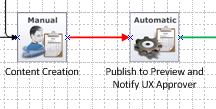
After Content Creation there is Publish to Preview and Notify US Approver activity which always takes note of current revision of author creation

C# Code Snippet: In Publish to Preview and Notify US Approver
Takes note of versions revision which will give you X of 1.X
       FullVersionInfo creatorVersionInfo = newComp.VersionInfo as FullVersionInfo;
versionNumber = creatorVersionInfo.Revision.Value;


 I would always compare this number after approver approves/ publisher approves. If he/she changed content. In below diagram: After US approver appoves --> content goes to Businnes-Approvers. So before going to Business Approvers. Send to Business-Approvers Review will check version number with above versionNumber. If something in content is changed after  Author sent for for approval then it will send back to author


C# Code Snippet: Send to Business-Approvers Review

ComponentData newComp = CoreServiceClient.Read(GetTcmUri(component.Id, component.LocationInfo.ContextRepository.IdRef,
0), options) as ComponentData;
FullVersionInfo VersionInfo = newComp.VersionInfo as FullVersionInfo;
int version = VersionInfo.Revision.Value;
if (version != versionNumber)
// then use DecisionActivityFinishData to Send Back to Author 
                               else
                                        // then use DecisionActivityFinishData to Assign to Business Approvers Review


Assign Back to Author ( Who last worked on Content Edition on that component) - Workflow

Often, I get below requirement in workflow

On Reject --> Workflow should be assigned back to author.
However, what happens if Business admin does "Assign Activity" if  content is assigned back to a different author at any point of workflow (Since initial author was on vacation or may be even he/she left company) In that case content should be picked up by other author.

In this case a new author is assigned to the content. And On Reject content should be going back to original author.

On Assign Back to Author content should go back to Activity Name: Content Creation
and ASSIGNED TO LAST PERFORMER OF THIS ACTIVITY


SCRIPT CODE of  Assign Back to Author

                                                      C# Code


public void BackToAuthor(string workitemid)
{
try
{
Stopwatch _watch = new Stopwatch();
_watch.Start();
Logger.Debug("Entered RPPTridionWorkflow BackToAuthor");
WorkItemData workitem = (WorkItemData)CoreServiceClient.Read(workitemid, options);
ProcessInstanceData processInstance = (ProcessInstanceData)CoreServiceClient.Read(
  workitem.Process.IdRef, options);
ActivityData[] ieActivities = processInstance.Activities;

if (ieActivities != null)
{
int currentActivity = ieActivities.Length - 1;
var targetactivity = (ActivityInstanceData)CoreServiceClient.Read(
 processInstance.Activities[currentActivity].Id, options);
ActivityData creatorActivityData = getActivityDataBasedOnName(workitemid, "Content Creation");
if (creatorActivityData != null)
{
var finishData = new ActivityFinishData();

finishData.Message = "Item Rejected";
finishData.NextAssignee = new LinkToTrusteeData
{
//This is where I retrieve the ACTIVITY INFORMATION of activity " Content Creation" using method getActivityDataBasedOnName(workitemid, "Content Creation"); 
IdRef = creatorActivityData.Owner.IdRef,
Title = creatorActivityData.Owner.Title
};
CoreServiceClient.FinishActivity(targetactivity.Id, finishData, options);
}
else
Logger.Error("Content Creation Activity not Found in BacktoAuthor");

Logger.Debug("Closing Core Service session:  BackToAuthor [" + _watch.ElapsedMilliseconds + " ms]");
}
}
catch (Exception ex)
{
Logger.Error("Exception in BackToAuthor" + ex.Message);

}
finally
{
CoreServiceClient.Close();
}
}
<!------------------ This method reads list of activities performed during the workflow. and get the activity information based on name. It always gets information of the activity the last time this is performed  -------------->

public ActivityData getActivityDataBasedOnName(string workitemid, string activityName)
{
WorkItemData workitem = (WorkItemData)CoreServiceClient.Read(workitemid, options);
ProcessInstanceData processInstance = (ProcessInstanceData)CoreServiceClient.Read(
  workitem.Process.IdRef, options);
ActivityData[] ieActivities = processInstance.Activities;
ActivityData lastActivityData = null;
foreach (ActivityData actData in ieActivities)
{
if (actData.Title.Contains(activityName))
lastActivityData = actData;
}
return lastActivityData;
}